
What TOTP Does
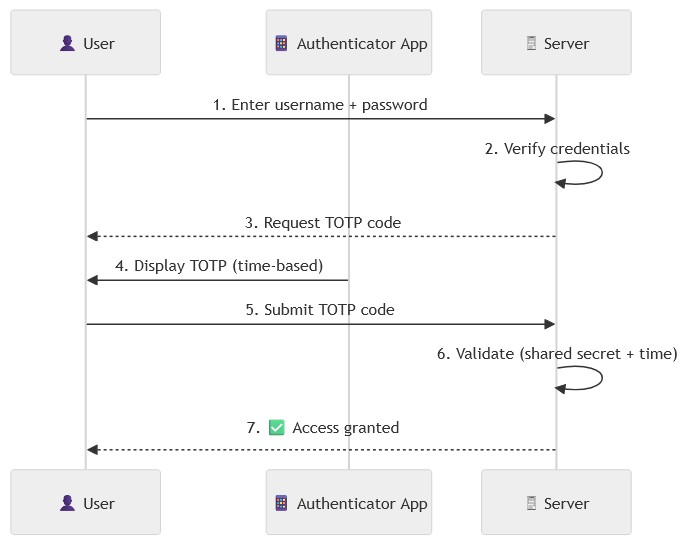
A Time-based One-Time Password (TOTP) is a security algorithm used as part of two-factor authentication (2FA) to protect against account attacks. The mechanism is integrated into dot-totp to enhance security by requiring both a password and an additional one-time code. Our implementation follows the industry standard of using an Authenticator app to generate temporary, unique 6 digit codes that change every 30 seconds.
In this article we will:
- Install
dot-totpin Dotkernel Admin. - Review how
dot-totpbehaves in the UI.
2FA with TOTP Flow
Below is a simplified flow for the 2FA with TOTP mechanism.
How to Install dot-totp
If you haven’t already, install Dotkernel Admin.
These installation steps should work similarly in any middleware-based application.
The first step is to include the package into your project by running this command:
composer require dotkernel/dot-totp
We will follow the Dotkernel file structure and create the files in the list below. If you follow the links from the main totp integration example, you can download the files and add them to your codebase.
- src/Admin/src/Form/RecoveryForm.php
- src/Admin/src/Form/TotpForm.php
- src/Admin/src/Handler/Account/GetDisableTotpFormHandler.php
- src/Admin/src/Handler/Account/GetEnableTotpFormHandler.php
- src/Admin/src/Handler/Account/GetRecoveryFormHandler.php
- src/Admin/src/Handler/Account/GetTotpHandler.php
- src/Admin/src/Handler/Account/PostDisableTotpHandler.php
- src/Admin/src/Handler/Account/PostEnableTotpHandler.php
- src/Admin/src/Handler/Account/PostValidateRecoveryHandler.php
- src/Admin/src/Handler/Account/PostValidateTotpHandler.php
- src/Admin/templates/admin/recovery-form.html.twig
- src/App/src/Middleware/CancelUrlMiddleware.php
- src/App/src/Middleware/TotpMiddleware.php
You can use the trait at src/Core/src/App/src/Entity/TotpTrait.php in any entity where you need 2FA.
Make sure to migrate the new columns
totpSecret,totp_enabledandrecovery_codesin your entity.
There are still some code snippets in the _misc folder:
- The enable/disable 2FA button should be used in the
view-account.html.twigfile or in a new page. - The routes updates must be added in the
src/Admin/src/RoutesDelegator.phpfile. - The pipeline updates must be added in the
config/pipeline.phpfile after$app->pipe(AuthMiddleware::class);. - The ConfigProvider updates must be added in the
src/Admin/src/ConfigProvider.phpfile.
Dot-totp in Action
Once you have dot-totp implemented, you can activate the feature in your admin accounts. If you navigate to your profile from the top-right image in Dotkernel Admin, you should see this box.

Simply click on ‘Enable TOTP’ to begin the activation process.
We blurred out the QR code and recovery codes for this tutorial. You will receive dynamically generated versions that will be fully visible to you.
You will need to have an Authenticator app installed on your mobile device.
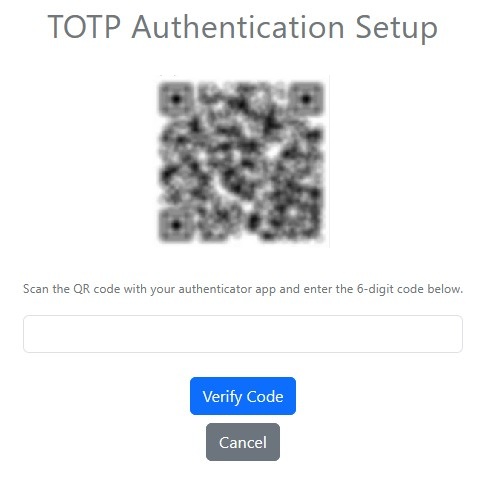
Follow the instructions on the screen:
- Scan the QR code with you mobile device.
- Enter the 6-digit code it generates on your mobile device.
The code refreshes every 30 seconds.
The TOPT activation flow will list several recovery codes you can use if your mobile device isn’t available.
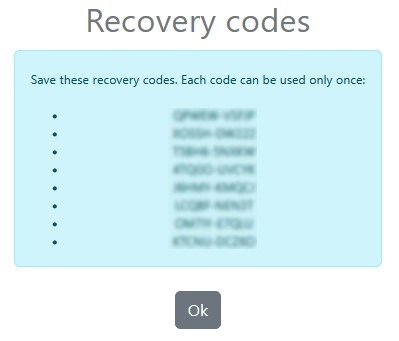
Each recovery code is usable only once.
Save the recovery codes in a secure location.
If the code is valid, you will be logged in, and TOTP will be activated for your account.
Whenever you need to log into the account, you will start by entering your username and password, like before. Since TOTP is activated, you will need to also submit the code from your Authenticator app. Alternatively, you can submit a recovery code.
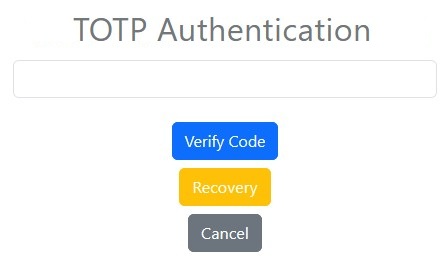
That’s it! You are now logged in securely.
Additional Resources
Looking for PHP, Laminas or Mezzio Support?
As part of the Laminas Commercial Vendor Program, Apidemia offers expert technical support and services for:
Leave a Reply