PHP_CodeSniffer or phpcs is a tool that helps developers maintain a specific standard in the way they write code. In order to be able to provide relevant information, phpcs needs to be configured correctly in PHPStorm (see image).
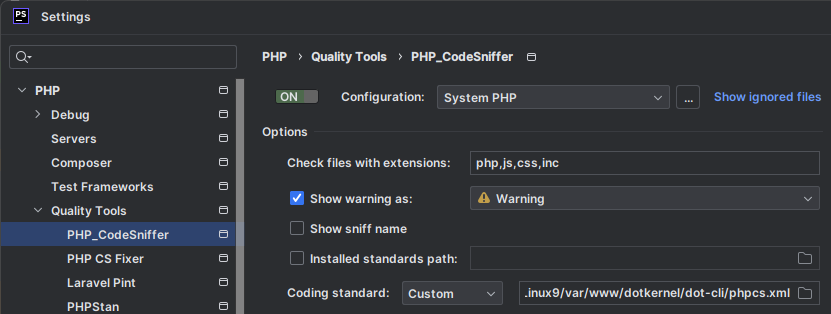
Whether you just cloned or you are already working on a project, follow the below guide on how to prepare your environment.
When Cloning a Project
- Windows Terminal: Move to the directory where you want to clone the project.
- Windows Terminal: Clone the project.
- PHPStorm: install composer dependencies.
- PHPStorm: restart.
- PHPStorm: Open Settings (File -> Settings) and go to PHP -> Quality Tools -> PHP_CodeSniffer:
- Make sure that the inspection button is ON.
- Coding standard is set to Custom and the field next to it contains the path to your project's phpcs.xml file.
For an Existing Project
- PHPStorm: Open Settings (File -> Settings) and go to PHP -> Quality Tools -> PHP_CodeSniffer. There, if Coding standard is set to Custom and the field next to it contains the path to your project's phpcs.xml file, then PHPStorm is configured correctly to use phpcs - NO need to continue with the next steps.
- PHPStorm: delete (if exists) the vendor directory.
- PHPStorm: install composer dependencies.
- PHPStorm: restart.
- Go to Step 1.
After you have the above configurations, you should start seeing information in the top-right corner of the editor.

Once PHPStorm has finished analyzing the opened file, you should see either a green tick (meaning no errors)

or a count of all the errors, warnings, and typos.
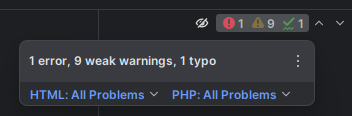
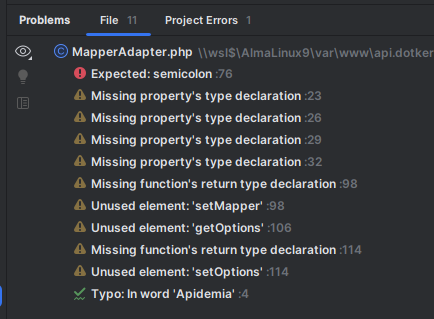
Clicking on them will open a section where you get detailed information on each item, their location, and recommendations on how to fix them.
Frequently Asked Questions
What is phpcs and why do you need to configure it in PHPStorm? +
PHP_CodeSniffer (phpcs) is a tool that helps developers maintain a specific standard in the way they write code. In order for it to provide relevant information, it needs to be configured correctly in PHPStorm.
What are the steps to set up phpcs in PHPStorm when cloning a new project? +
Move to the directory where you want to clone the project, clone the project, install composer dependencies in PHPStorm, restart PHPStorm, then open Settings (File -> Settings) and go to PHP -> Quality Tools -> PHP_CodeSniffer, making sure the inspection button is ON and the Coding standard is set to Custom with the field pointing to your project's phpcs.xml file.
How do you check whether phpcs is already configured correctly for an existing project? +
Open Settings (File -> Settings) and go to PHP -> Quality Tools -> PHP_CodeSniffer. If Coding standard is already set to Custom and the field points to your project's phpcs.xml file, PHPStorm is configured correctly and there's no need to continue with the next steps.
What should you do if phpcs is not configured correctly on an existing project? +
Delete the vendor directory if it exists, install composer dependencies, restart PHPStorm, and then go back and repeat the check from Step 1 of the existing-project process.
How do you know phpcs is working once configured? +
After the above configuration, you should start seeing information in the top-right corner of the editor: a green tick means no errors, while a count indicates errors, warnings, or typos. Clicking on them opens a section with detailed information on each item, its location, and recommendations on how to fix it.