What Dotkernel Queue Is
Dotkernel Queue is a component based on Symfony Messenger that is used to queue asynchronous tasks. netglue/laminas-messenger is an adapter that integrates Symfony Messenger with the Laminas Service Manager container for Mezzio/Laminas applications.
Some everyday operations are time-consuming and resource-intensive, so it's best if they run on separate machines, decoupled from the regular request-response cycle. Asynchronous execution performed by background workers ensures these operations are not lost, terminated by PHP timeouts, or interrupted by new requests. The main benefit is preventing the main platform from overloading, so it can return a response and remain responsive to new requests while the heavy lifting is scheduled to run later.
The main goal for the queue is to not have the main platform wait for a response, because the queue executes the task sometime in the future. The regular request-response cycle is completed swiftly by the main platform, possibly with a confirmation message; afterward, the main platform can check with the queue regularly to see if the requested task was completed.
Why Use Dotkernel Queue?
Instead of going straight to Symfony Messenger, using Dotkernel Queue offers several benefits:
- It uses the Symfony Messenger mechanisms at its heart, so it stays updated as Symfony Messenger releases updates.
- netglue/laminas-messenger turns the component into middleware compatible with Mezzio/Laminas.
- It is seamlessly compatible with the Dotkernel Headless Platform, sharing the same file structure and the same Core submodule used across the Dotkernel application suite (Frontend, API, Admin), ensuring consistency across the platform.
- Dotkernel Queue is a standalone application in its own right, so it can be added more easily to an existing platform.
- The implemented queue features are used in the team's own projects, so their worth is guaranteed in live projects.
Why Decouple Operations from the HTTP Request-Response Cycle?
By default, PHP settings impose a maximum execution time of 30 seconds via the max_execution_time parameter.
Extending the interval isn't practical up to hours or days for a simple request, and even 30 seconds is unreasonably long for a website that normally expects a response in a few seconds or under 1 second.
The solution is to delegate the execution of those tasks to an outside system specifically designed for this purpose.
What Are Tasks with Long Execution?
Tasks delegated to the queue typically:
- Take extended periods of time to execute and may be interrupted by PHP limitations.
- Are external calls that introduce delays from authentication, awaiting responses from potentially multiple interrogations, or may fail because the 3rd party server is offline.
- Are not part of the main PHP request-response cycle.
Categories of tasks that can take an extended time to finish:
- Data Processing - big data analytics, scientific simulations, or mathematical computations.
- File Handling & Media Processing - video and image processing, or compression/decompression of large files.
- Networking - sending email, newsletters, notifications using 3rd party providers.
- Database Operations - imports/exports or migrations.
- System & Infrastructure Tasks - OS updates, software compilation, CI pipelines.
Reasons for long execution times include: data size (gigabytes, terabytes, etc.), complex algorithms, hardware limitations (CPU speed, memory, storage, network bandwidth), and external dependencies (waiting on APIs or human input).
How the Dotkernel Queue Works
The queue system has an active daemon that listens for TCP connections on a specific port and stores incoming messages into Redis. This supports a large number of requests per second without overloading. Operations are then scheduled for execution when resources are available, using the FIFO (First-In, First-Out) method, where the oldest request is processed first, followed by newer requests.
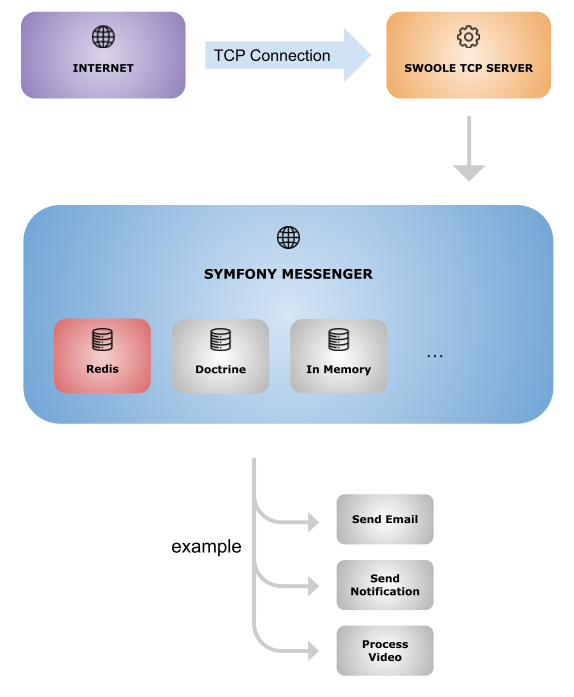
Main Features
The following features are already implemented and have been tried and tested extensively in the team's live projects.
Logging
Logging allows developers to monitor operations and investigate issues, helping pinpoint the cause of an error for faster bug fixes and less downtime. Detailed queue logs ensure the execution of long operations is maintainable and allows debugging, though project-specific core logic must still be coded to satisfy business requirements.
Security
Access control is secured by a firewall that only allows requests from whitelisted IPs, keeping the queue as fast as possible without delays from generating and authenticating dynamic tokens. A more secure setup is to keep the Dotkernel Queue server accessible only via the internal network, which removes the need for the firewall and simplifies initial queue setup.
Retry Mechanism
If message processing fails, an internal retry feature guarantees reliable and stable execution. The system can be configured to retry failing tasks a certain number of times, logging the cause each time, before giving up and reporting a failure. After configuring the number of retries, additional handling of failed messages is left to the developer: some failures (e.g. an invalid email address) won't fix themselves on retry, while others (e.g. a temporarily overloaded database with valid queries) just need to run later.
Reporting
Logs enable developers to investigate metrics via console commands, including:
- Queue length - how many jobs are in the to-do list.
- Processing time per job.
- Error rates - how many messages failed.
- Throughput - jobs/sec processed.
Dead Letter Queue (DLQ)
A Dead-Letter Queue is a separate message queue that temporarily stores messages that failed execution due to errors - for example, incomplete messages, or a 3rd party receiver unable to process the request or unavailable. Certain errors may move messages into the DLQ on the first try, keeping the main queue from being overwhelmed or blocked by messages that will never be processed in their current state. It also gives troubleshooters a central location to identify causes of errors, apply fixes, and then either manually push the messages back into the main queue or delete them.
Future Features
Ways to improve Dotkernel Queue are being explored, with new features added as needed in the field.
Priorities
Currently the queue works on the FIFO method described above. Priorities would determine how soon a task begins execution - immediately or delayed - since certain tasks may be fast enough to handle as they come in, while others are purposefully pushed further down the line. Priorities are set to be integrated into Dotkernel Queue in the near future.
Parallel Execution
Execution is currently made for each task one at a time. Parallel execution of operations via multiple workers is being investigated, where applicable - for example, preprocessing a report could run in parallel with sending emails, since they are separate systems (email processing is external, while the report uses data from the internal database).
Frequently Asked Questions
What is Dotkernel Queue? +
Dotkernel Queue is a component based on Symfony Messenger used to queue asynchronous tasks. It uses the netglue/laminas-messenger adapter to integrate Symfony Messenger with the Laminas Service Manager container for Mezzio/Laminas applications.
Why use Dotkernel Queue instead of using Symfony Messenger directly? +
Dotkernel Queue builds on Symfony Messenger's mechanisms so it stays updated as Symfony Messenger evolves, uses netglue/laminas-messenger to work as Mezzio/Laminas-compatible middleware, shares the same file structure and Core submodule as the Dotkernel Headless Platform for seamless compatibility, works as a standalone application that can be added to an existing platform, and includes features already tried and tested in the team's own live projects.
Why should long-running operations be decoupled from the HTTP request-response cycle? +
By default, PHP imposes a maximum execution time of 30 seconds via the max_execution_time parameter, which is too long for a typical request. Instead of extending that limit, the solution is to delegate such tasks to an outside system designed for this purpose, so the main platform can return a response quickly and stay responsive to new requests.
How does the Dotkernel Queue process messages? +
An active daemon listens for TCP connections on a specific port and stores incoming messages into Redis, which supports a large number of requests per second without overloading. Messages are then scheduled for execution using the FIFO (First-In, First-Out) method, so the oldest request is processed first.
What happens when a queued message fails to process? +
A configurable retry mechanism retries failing tasks a set number of times, while logging the cause, before giving up and reporting a failure. Messages that ultimately fail can be moved into a Dead Letter Queue, a separate store for failed messages, where troubleshooters can identify the cause, apply a fix, and either push the message back into the main queue or delete it.
What features is Dotkernel Queue planning to add in the future? +
Two features are being investigated: Priorities, which would let tasks begin execution sooner or later instead of strictly following FIFO order, and Parallel Execution, which would let independent operations run at the same time via multiple workers, such as preprocessing a report in parallel with sending emails.